How to toggle Dark/Light Mode using JavaScript
Published
•3 min read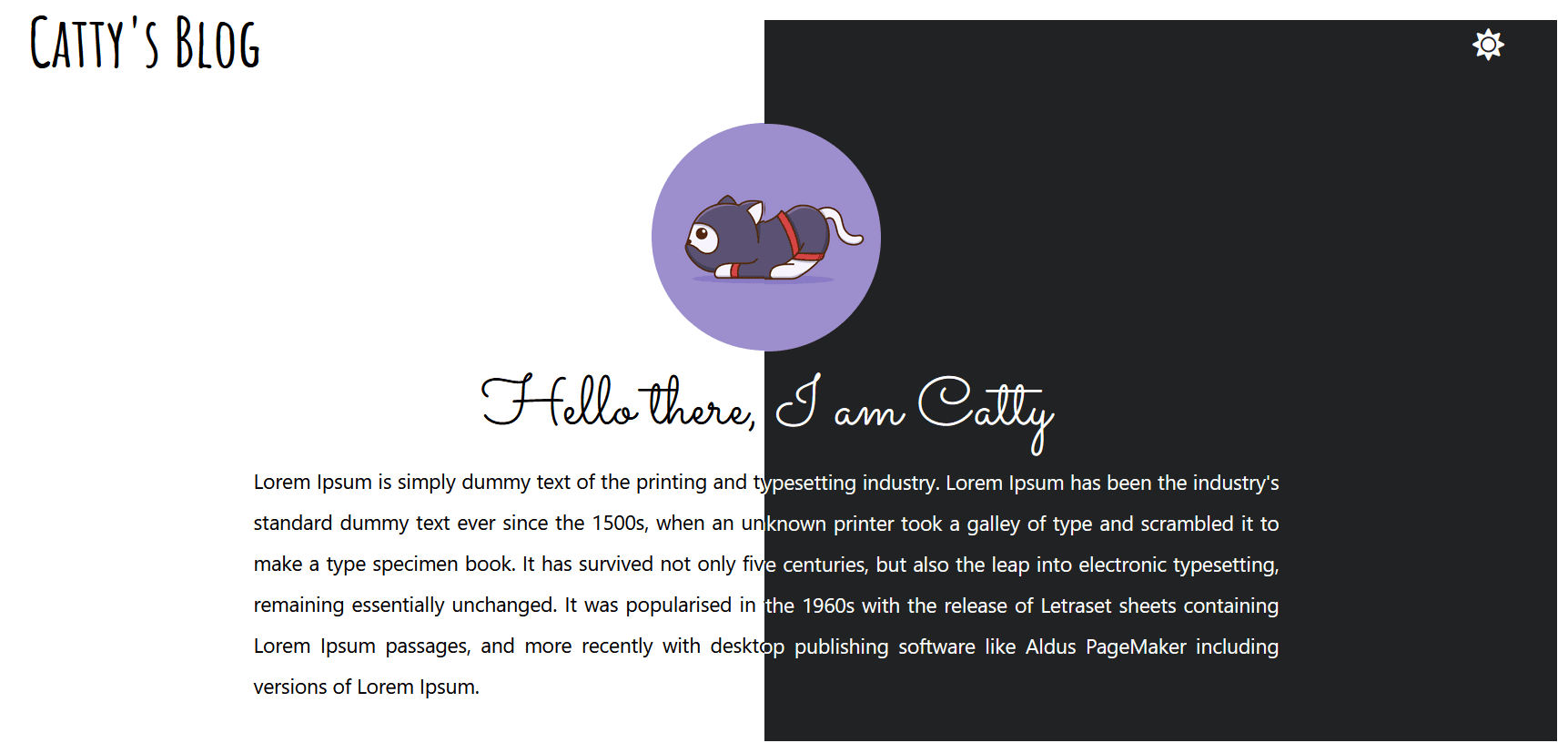
D
I am 17 years old and a young passionate and self-taught frontend web developer and have an intention to become a successful developer. I usually write about JavaScript and Web Development and share some tips in the articles.
Hello, I am back with a new amazing article on Toggle Dark / Light Mode

Let's get started 🚀
Libraries used
- Fontawesome
- Bootstrap
Create
index.html<div class="container"> <div class="header d-flex justify-content-between"> <h1 class="title mt-2">Catty's Blog</h1> <span class="mt-4 fs-3 dark toggle"><i class="fas fa-moon d-none" id="dark" title="Switch to Dark Mode"></i></span> <span class="mt-4 fs-3 light toggle" id="light"><i class="fas fa-sun" title="Switch to Light Mode"></i></span> </div> <center> <div class="main"> <div class=""> <img src="assets/cat-2.webp" class="catty mt-2 rounded-circle" alt="I am Catty"> <div class="card-body"> <h1 class="card-title"> Hello there, I am <a href="http://github.com/snowbit-coderboi" target="_blank" class="catty-name text-decoration-none" id="cattyName">Catty</a> </h1> <p class="info"> Lorem Ipsum is simply dummy text of the printing and typesetting industry. Lorem Ipsum has been the industry's standard dummy text ever since the 1500s, when an unknown printer took a galley of type and scrambled it to make a type specimen book. It has survived not only five centuries, but also the leap into electronic typesetting, remaining essentially unchanged. It was popularised in the 1960s with the release of Letraset sheets containing Lorem Ipsum passages, and more recently with desktop publishing software like Aldus PageMaker including versions of Lorem Ipsum. </p> </div> </div> </div> </center> </div>In
style.css
@import url('https://fonts.googleapis.com/css2?family=Amatic+SC:wght@700&display=swap');
@import url('https://fonts.googleapis.com/css2?family=Sacramento&display=swap');
body{
    background-color: #212224;
    color: #fff;
    transition: 0.5s;
    -webkit-transition: 0.5s;
    -moz-transition: 0.5s;
    -ms-transition: 0.5s;
    -o-transition: 0.5s;
}

.title{
    font-family: 'Amatic SC', cursive;
    font-size: 60px;
    user-select: none;
}

.toggle{
    cursor: pointer;
    transition: 0.5s;
    -webkit-transition: 0.70s;
    -moz-transition: 0.70s;
    -ms-transition: 0.70s;
    -o-transition: 0.70s;
}
#light:hover{
    color: yellow;
}

.catty-name{
    color: #fff;
    transition: 0.3s;
    -webkit-transition: 0.3s;
    -moz-transition: 0.3s;
    -ms-transition: 0.3s;
    -o-transition: 0.3s;
}
.catty-name:hover{
    color: #fff;
    transition: 0.7s;
    -webkit-transition: 0.7s;
    -moz-transition: 0.7s;
    -ms-transition: 0.7s;
    -o-transition: 0.7s;
    font-size: 70px;
}
.main{
    margin-bottom: 15px;
    margin-top: 20px;
}
.card-title{
    font-family: 'Sacramento', cursive;
    font-size: 60px;
}
.card-list{
    /* font-family: 'Sacramento', cursive; */
    font-size: 30px;
    list-style: none;
}
.card-list li:before { content: '😸'; margin-left: -10px; margin-right: 10px; }

.catty{
    max-height: 200px;
    object-fit: contain;
    /* transform: rotate(20deg); */
    transition: 0.70s;
    -webkit-transition: 0.70s;
    -moz-transition: 0.70s;
    -ms-transition: 0.70s;
    -o-transition: 0.70s;
}
.catty:hover{
    transition: 0.70s;
  -webkit-transition: 0.70s;
  -moz-transition: 0.70s;
  -ms-transition: 0.70s;
  -o-transition: 0.70s;
  -webkit-transform: rotate(350deg);
  -moz-transform: rotate(350deg);
  -o-transform: rotate(350deg);
  -ms-transform: rotate(350deg);
  transform: rotate(360deg);
}
.catty{
    max-height: 200px;
    object-fit: contain;
    /* transform: rotate(20deg); */
    transition: 0.70s;
    -webkit-transition: 0.70s;
    -moz-transition: 0.70s;
    -ms-transition: 0.70s;
    -o-transition: 0.70s;
}
.info{
    text-align: justify;
    line-height: 2em;
    max-width: 900px;
    font-size: 18px;
}
- In
index.js
const dark = document.getElementById('dark')
const light = document.getElementById('light')
const catty = document.getElementById('cattyName')

function toggleDark(){
    dark.classList.add('d-none')
    light.classList.remove('d-none')
    document.body.style.backgroundColor = "#212224"
    document.body.style.color = "#fff"
    catty.style.color = "#fff"
}

dark.addEventListener('click', toggleDark)

function toggleLight(){
    light.classList.add('d-none')
    dark.classList.remove('d-none')
    document.body.style.backgroundColor = "#fff"
    document.body.style.color = "#000"
    catty.style.color = "#000"
}
light.addEventListener('click', toggleLight)
Check out the live demo: https://codewithsnowbit.github.io/dark-light-toggle/
Download Code / Assets: https://github.com/codewithsnowbit/dark-light-toggle
Let’s connect
If you found my content helpful and would like to thank me, feel free to Buy me a coffee :)
I hope you liked this post; And make sure to share the feedback 🙂 in comment sections
Have a great day!